Free Chrome extension for YouTube
YouTube captions, copied in one click.
CaptionPull puts a button under every YouTube video. Click it and the whole transcript opens right next to the player, with timestamps, ready to copy or download.
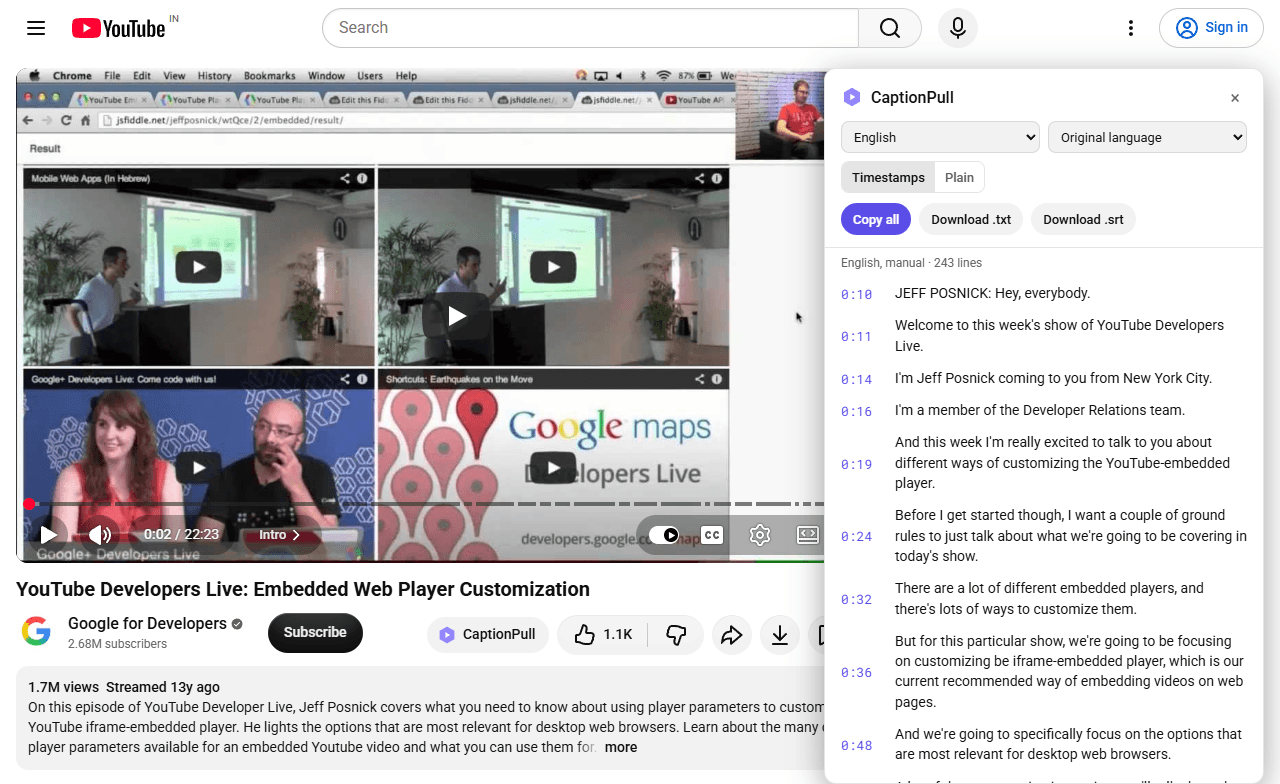
What it does
Timestamps you can click
Every line has its time next to it. Click one and the video jumps straight there.
Plain text too
Switch off the timestamps when you only want the words, ready to paste into notes.
Copy or download
Copy everything in one click, or save it as a .txt file or an .srt subtitle file.
Translate into 25 languages
Hindi, Spanish, Arabic, Japanese and more, using YouTube's own auto-translate.
Picks the better track
When a creator wrote their own captions, CaptionPull shows those before the auto-generated ones.
Tells you up front
If a video has no captions, the button turns grey and says "No captions" before you click.
How it works
- 1
Add it to Chrome
One click from the Chrome Web Store. No account, no sign-up.
- 2
Open any YouTube video
A CaptionPull button appears under the video, next to Like and Share.
- 3
Click it
The full transcript opens beside the player. Read it, copy it or save it.
Your data stays with you
CaptionPull runs entirely in your browser. Captions come straight from YouTube to your screen, with no server of ours in between. There is no account, no tracking and nothing to sign up for. The privacy policy explains it in full.
Stop copying transcripts by hand
Questions first? The support page has answers.